


Search Intent Mapper, Gap Audit Tool for SEO Agencies
As part of our wider SEO services in India hub, this Search Intent Mapper helps you check whether each keyword should target a service page, guide, comparison page, pricing page, local page, or another page type before you invest in content.
Search Intent Mapper
Map keyword intent, compare it with your current page type, and uncover SEO intent mismatches before they cost rankings.
Client-side analysis only. No data is sent anywhere.
1 Keyword List Required
Paste one keyword per line. Casing is preserved in output.
2 SERP URLs
Group SERP URLs by keyword. Optional but improves accuracy.
3 Current Pages
Map current pages and types for mismatch detection.
i Page Types
Use these labels (or close variants) in the Current Pages box.
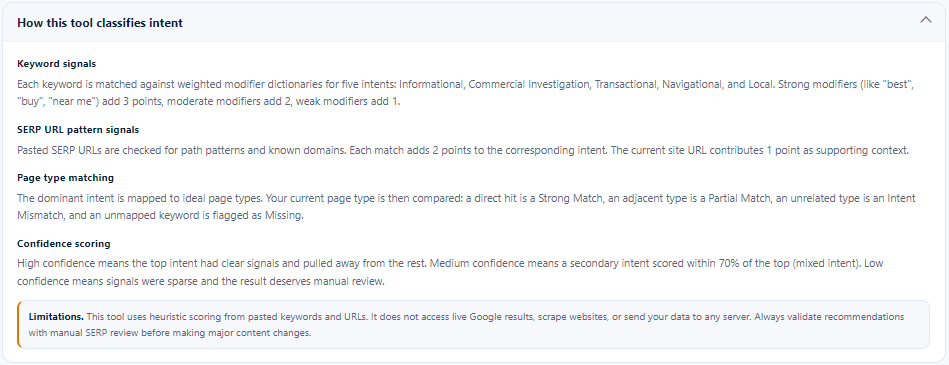
Keyword signals
Each keyword is matched against weighted modifier dictionaries for five intents: Informational, Commercial Investigation, Transactional, Navigational, and Local. Strong modifiers (like "best", "buy", "near me") add 3 points, moderate modifiers add 2, weak modifiers add 1.
SERP URL pattern signals
Pasted SERP URLs are checked for path patterns and known domains. Each match adds 2 points to the corresponding intent. The current site URL contributes 1 point as supporting context.
Page type matching
The dominant intent is mapped to ideal page types. Your current page type is then compared: a direct hit is a Strong Match, an adjacent type is a Partial Match, an unrelated type is an Intent Mismatch, and an unmapped keyword is flagged as Missing.
Confidence scoring
High confidence means the top intent had clear signals and pulled away from the rest. Medium confidence means a secondary intent scored within 70% of the top (mixed intent). Low confidence means signals were sparse and the result deserves manual review.
Table of Contents
Why search intent mapping matters
Many SEO pages underperform because the keyword and page format do not match. A query like best CRM software usually needs a comparison or review-style page, while CRM pricing may need a pricing, product, or service page. A guide, service page, category page, and local landing page can all target valuable keywords, but each one solves a different search problem.
The Search Intent Mapper helps you review those decisions before content production. It is especially useful when you are building service pages, improving an SEO content hub, auditing existing URLs, or deciding whether a keyword deserves a blog post, landing page, comparison page, or transactional page.
What inputs to use
The tool is designed for quick keyword-to-page diagnosis. You can run it with only a keyword list, but the result becomes more useful when you add SERP and current-page context.
| Input | What to add | Why it helps |
|---|---|---|
| Keyword list | One keyword per line. | Used to detect informational, commercial investigation, transactional, navigational, and local intent signals. |
| SERP URLs | Keyword followed by ranking URLs in the format keyword | url1, url2, url3. | Helps the tool read page-pattern signals from ranking result types. |
| Current site URLs | Keyword, current URL, and current page type in the format keyword | current URL | current page type. | Used to compare your existing page against the ideal page type. |
| Page type labels | Homepage, Product Page, Service Page, Blog / Guide, Comparison / Alternatives Page, Pricing Page, Local Landing Page, and related labels. | Allows the mapper to flag strong matches, partial matches, missing pages, and intent mismatches. |
What the tool analyzes and outputs
The Search Intent Mapper classifies query intent by keyword and SERP URL pattern signals. Then it compares your current page type against the ideal page type and turns the result into a practical intent mismatch report.
- Intent classification: informational, commercial investigation, transactional, navigational, or local.
- Confidence level: high, medium, or low depending on the strength and clarity of signals.
- Ideal page type: the recommended page format for the dominant intent.
- Match status: strong match, partial match, intent mismatch, or missing page.
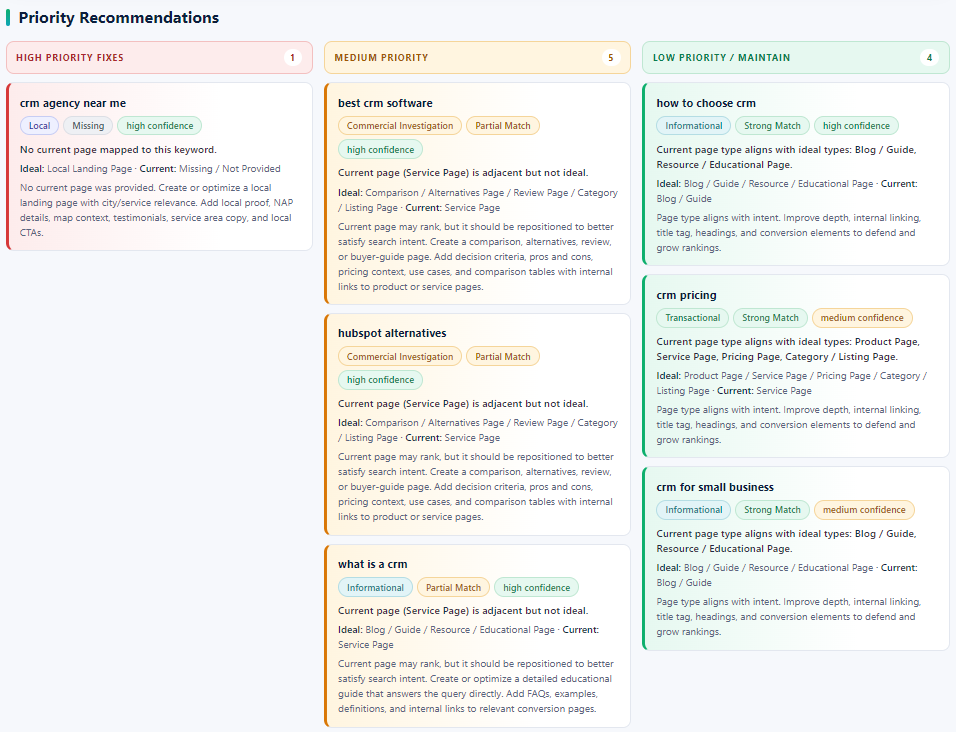
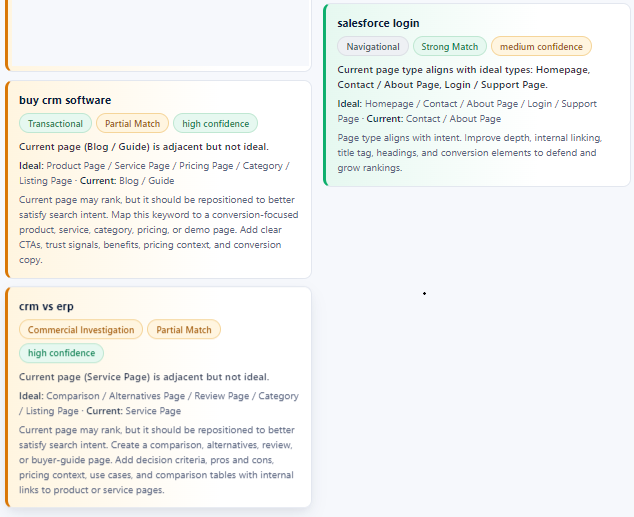
- Priority recommendations: high, medium, and low priority actions to fix or maintain pages.
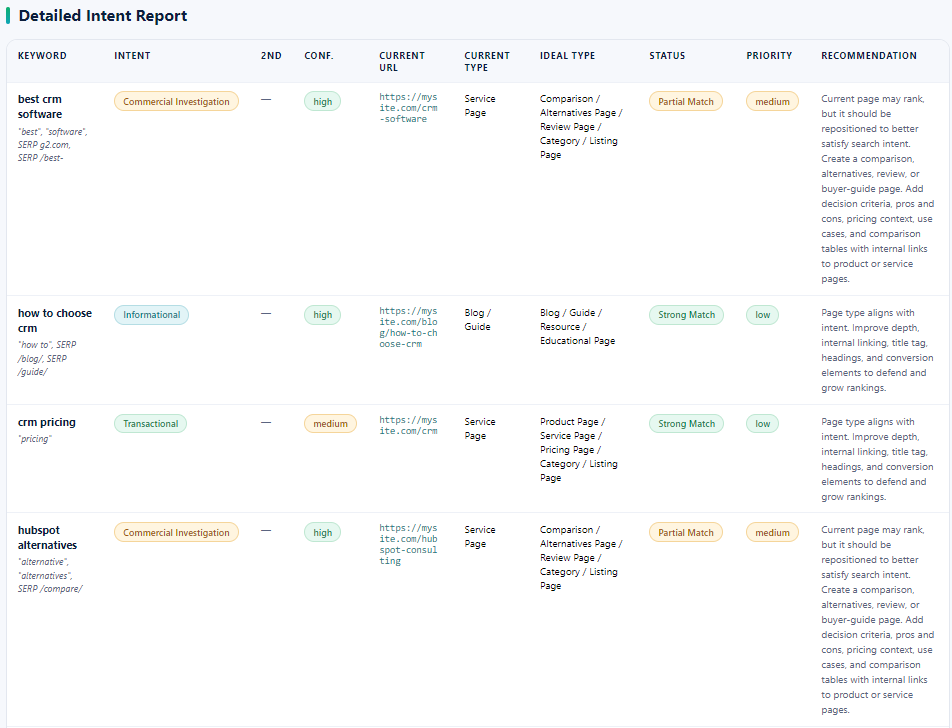
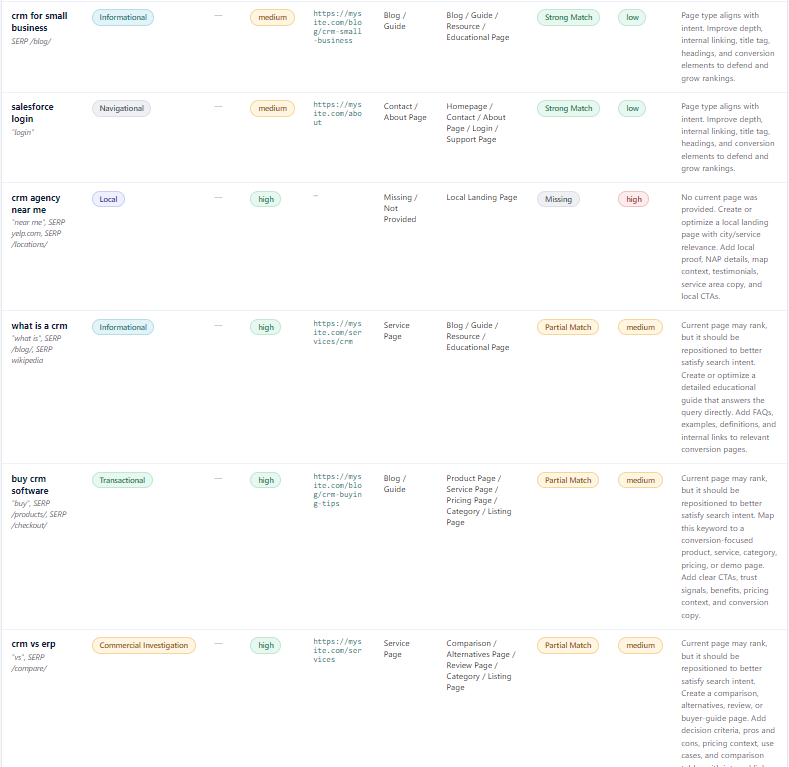
- Detailed intent report: a table you can copy or export as CSV for SEO planning.
Use the output as a decision aid. For important commercial or service keywords, validate the top SERP manually before changing a live page.
Want Supramind to Fix the Intent Gaps?
Share your keywords and current URLs with Supramind, and we can turn the mapper output into page recommendations, content rewrites, internal links, and conversion-ready SEO fixes.
Get My SEO Intent Gap AuditHow to use the tool
Use this workflow when planning new SEO pages, reviewing underperforming URLs, or checking whether a keyword should be served by a blog, service page, comparison page, pricing page, local landing page, or support page.
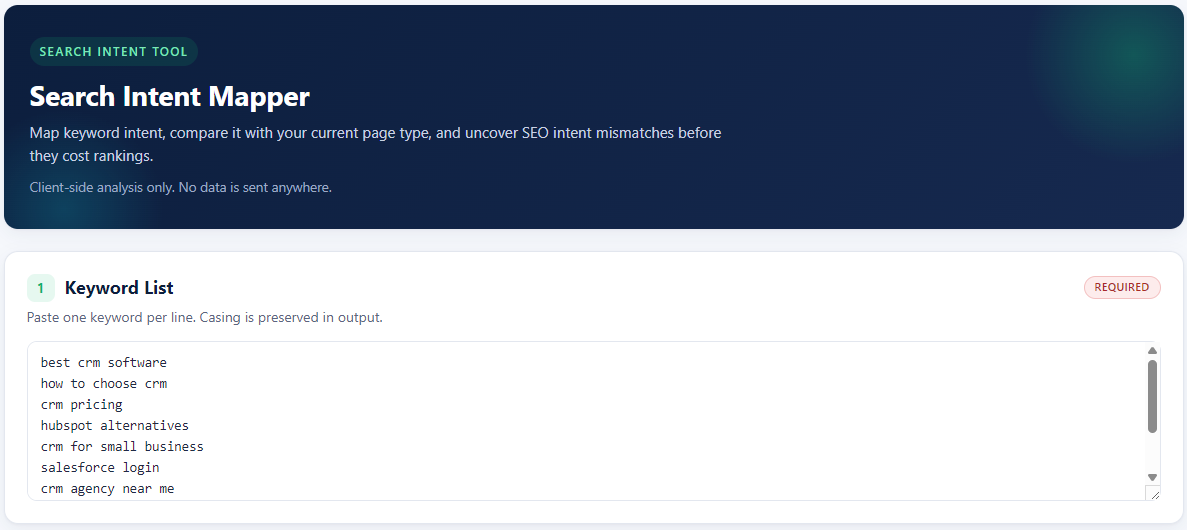
1. Add your keyword list
Paste one keyword per line. Keep the list focused on one broad topic or service theme when you want a cleaner intent report.
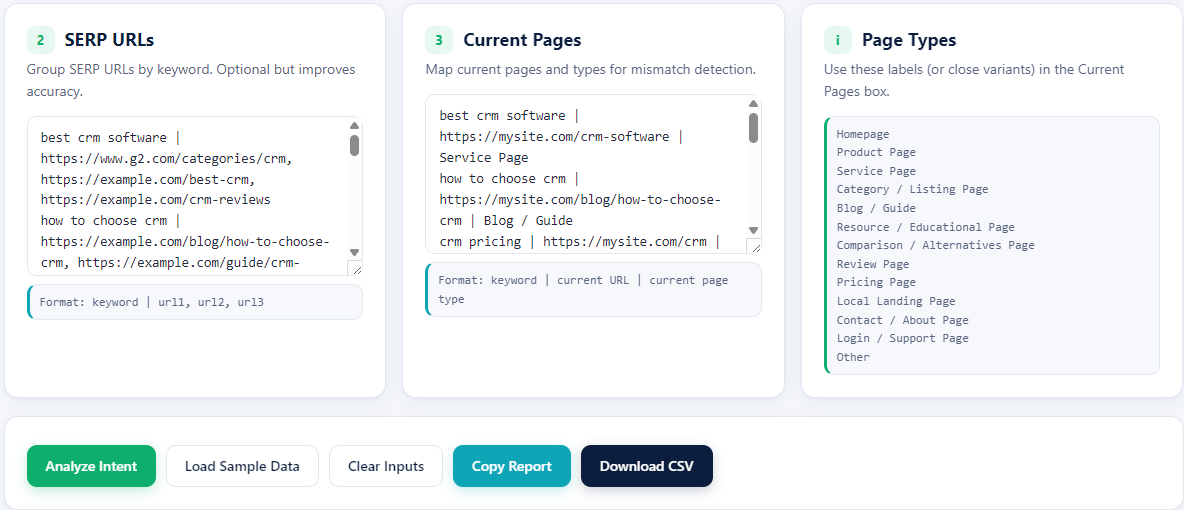
2. Add SERP URLs, current pages, and page type labels
Add ranking URLs grouped by keyword when you have them. Then map your current page URL and current page type so the tool can detect whether the existing page format is aligned, adjacent, missing, or mismatched.
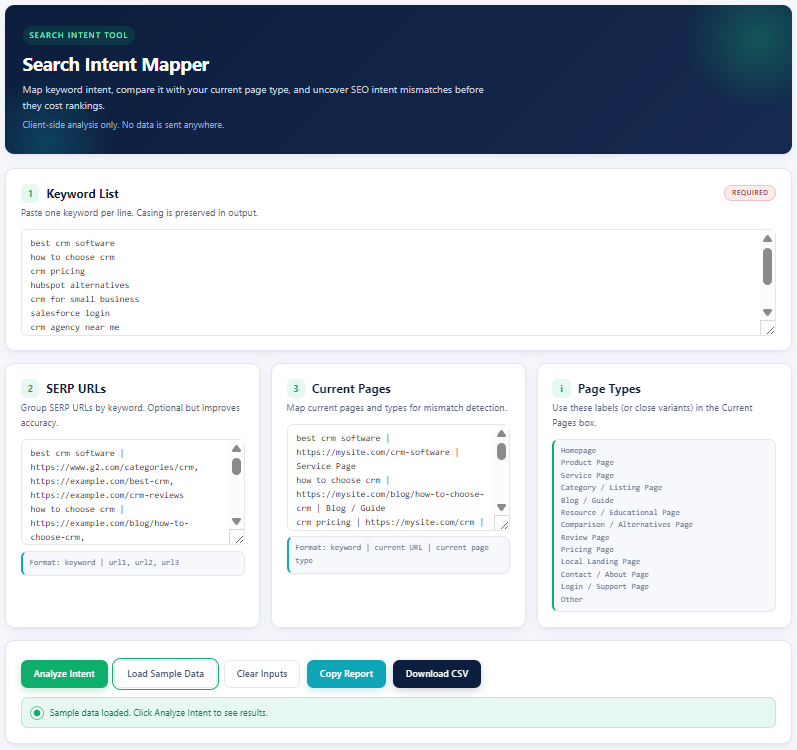
3. Load sample data or input your own data
If you are testing the tool first, use the sample data. For a real audit, replace the sample keywords and URLs with your own service, product, blog, comparison, pricing, local, or support page data.
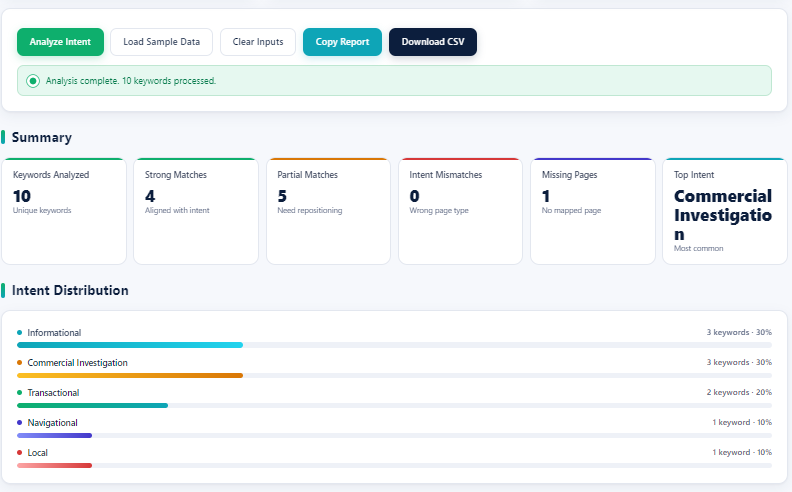
4. Analyze the intent distribution
Click Analyze Intent. The summary shows how many keywords were processed, how many pages are strong matches, how many need repositioning, and which intent type dominates the keyword set.
5. Review priority recommendations
Start with high-priority missing pages and intent mismatches. Medium-priority partial matches usually need better positioning, while low-priority strong matches may only need depth, internal links, title improvements, and conversion polish.
6. Check the detailed intent report
The detailed report gives the keyword, detected intent, confidence, current URL, current page type, ideal page type, status, priority, and recommendation. Use this table for client notes, content briefs, or SEO sprint planning.
7. Read how the tool classifies intent
The methodology section explains how keyword modifiers, SERP URL patterns, page type matching, and confidence scoring work. This helps you understand why the tool recommends a specific page type.
Final note
This tool is meant to make search intent decisions faster, not to replace expert SEO review. Use it to surface mismatches, then prioritize pages by ranking value, conversion potential, content difficulty, and business importance.
FAQ
What does the Search Intent Mapper do?
It classifies keyword intent, compares that intent with your current page type, and highlights where the page may be aligned, partially aligned, missing, or mismatched.
What inputs should I add?
Add one keyword per line. For better accuracy, also add SERP URLs grouped by keyword, your current site URL for that keyword, and the current page type label.
Does this tool scrape Google or send data to a server?
No. The mapper works from the keywords and URLs you paste into the form. It is client-side and does not crawl websites or upload your data.
How should I use the intent mismatch report?
Use high-priority missing pages and intent mismatches first. Then refine partial matches by improving the page format, title, headings, internal links, proof points, and conversion sections.
Is this a replacement for manual SERP review?
No. It is a planning assistant. Use the output to speed up diagnosis, then validate important keywords manually before changing high-value service pages.
- Log in to post comments


 INDIA
INDIA