


Internal Link Opportunity Finder to spot Internal Linking gaps
As part of our SEO Company in India hub, this Internal Link Opportunity Finder helps you spot internal linking gaps faster. Add your crawl export, sitemap, priority pages, and anchor rules to find orphan pages, weak authority paths, and practical source-to-target link suggestions.
Internal Link Opportunity Finder
Surface orphan pages, weak authority paths, and missed contextual linking opportunities from your crawl, sitemap, and target URLs.
Paste or upload your data below. All processing happens in your browser — no data is sent anywhere.
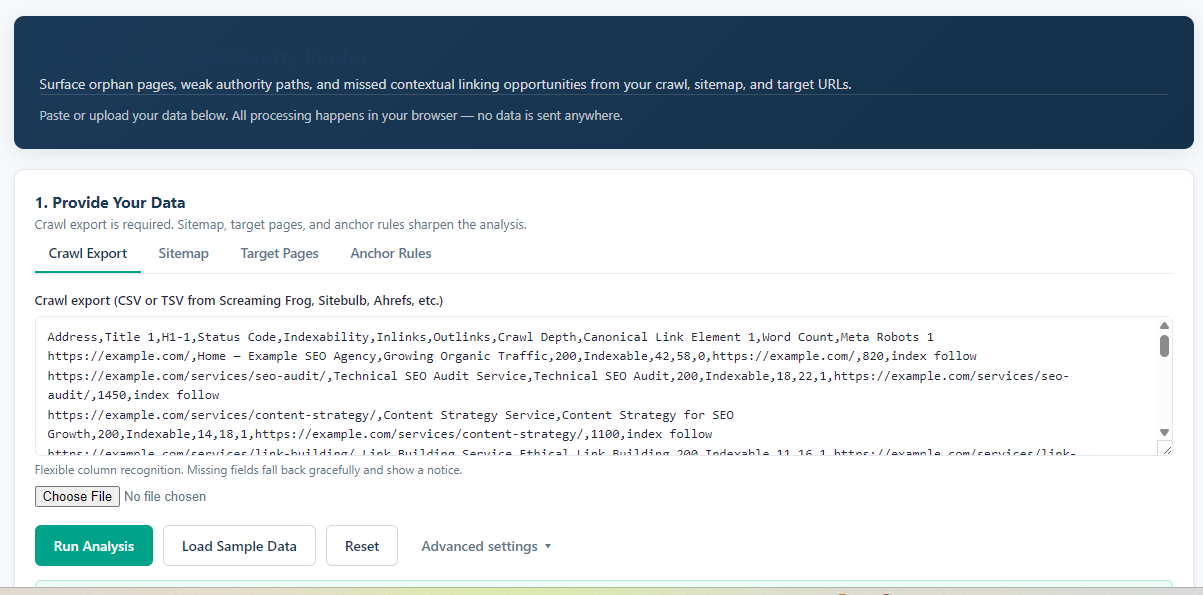
1. Provide Your Data
Crawl export is required. Sitemap, target pages, and anchor rules sharpen the analysis.
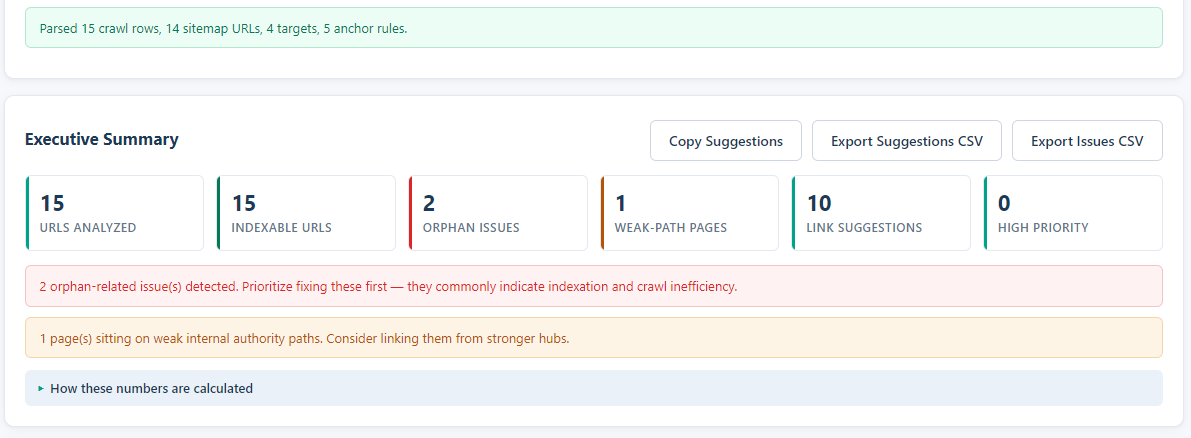
Executive Summary
How these numbers are calculated
- Orphan pages = URLs in sitemap/targets but absent from crawl, or crawled URLs with zero internal inlinks.
- Weak authority paths = pages whose crawl depth exceeds the healthy threshold and whose internal inlinks are at or below the low-inlinks threshold.
- Contextual opportunities = source→target pairs where Title / H1 / URL slug tokens overlap above the relevance threshold, and where the target is a priority page.
- Priority score blends topical relevance (50%), source page strength from inlink count (20%), and how under-linked the target is (30%).
- All URLs are normalized (lowercased host, trailing slash stripped, fragments removed, query strings optionally ignored) before comparison.
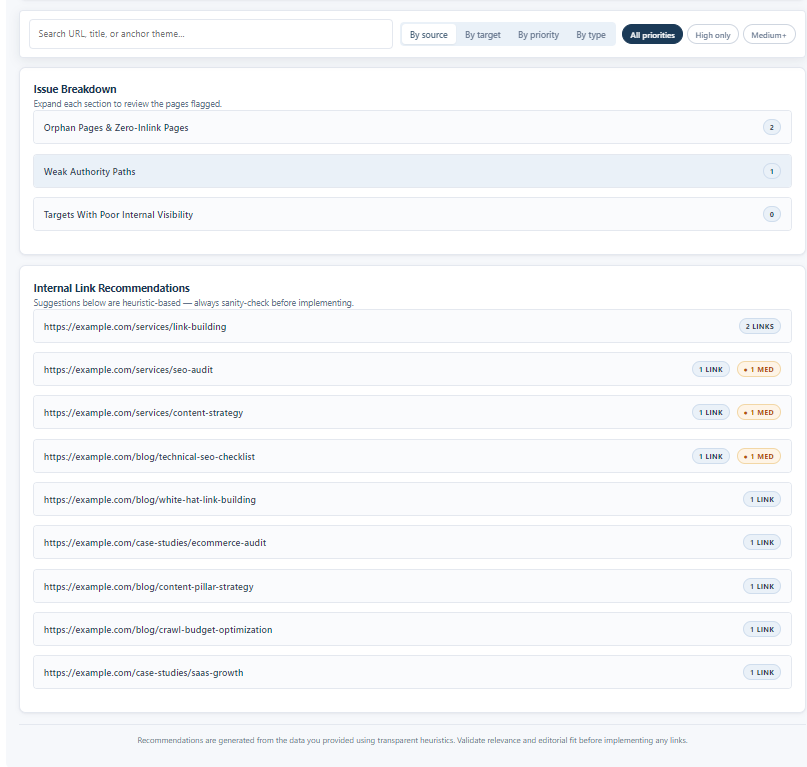
Issue Breakdown
Expand each section to review the pages flagged.
Internal Link Recommendations
Suggestions below are heuristic-based — always sanity-check before implementing.
What this Internal Link Opportunity Finder does
The tool is built for SEO teams that already have crawl data but need a faster way to turn that data into internal linking actions. Instead of manually comparing crawl depth, inlinks, sitemap URLs, and target pages, it organizes the most useful opportunities in one place.
It helps review:
- Orphan pages and zero-inlink pages
- Priority pages that are missing from the crawl
- Pages sitting too deep in the site architecture
- Target pages with weak internal visibility
- Contextual source pages that can link to priority targets
- Suggested anchor themes based on page titles, H1s, and URL tokens
Inputs you can put into the tool
The crawl export is the main input. Sitemap, target pages, and anchor text rules make the analysis more focused.
| Input | What to add | How it improves the output |
|---|---|---|
| Crawl export | CSV or TSV from Screaming Frog, Sitebulb, Ahrefs, or a similar crawler. | Helps detect inlinks, crawl depth, indexability, page titles, H1s, canonical signals, and weak internal paths. |
| Sitemap | Sitemap XML or a simple URL list. | Helps identify URLs that exist in the sitemap but are missing from the crawl, which may indicate orphan or uncrawlable pages. |
| Target pages | Money pages, service pages, high-value blogs, case studies, or priority pages you want to strengthen. | Guides the tool toward the pages that deserve more internal links and better internal visibility. |
| Anchor text rules | Rules such as prefer partial-match anchors, avoid repetition, use natural contextual anchors, or allow branded anchors. | Improves anchor suggestions so they are more natural and easier to review before implementation. |
How to use the tool
1. Add your crawl, sitemap, targets, and anchor rules
Start with your crawl export. Then add your sitemap, priority target pages, and anchor rules if available. This gives the tool enough context to separate general crawl issues from pages that matter most for rankings and conversions.
2. Run the analysis and check the executive summary
After running the analysis, review the summary cards first. They show how many URLs were analyzed, how many are indexable, how many orphan issues were found, whether weak-path pages exist, and how many internal link suggestions were generated.
3. Review issue breakdown and link recommendations
Open the issue sections to inspect orphan pages, weak authority paths, and target pages with poor visibility. Then review the internal link recommendations by source page, target page, priority, or type.
How to read the output
Orphan pages and zero-inlink pages
These should usually be checked first. If a valuable page has no internal links or appears in the sitemap but not in the crawl, search engines and users may struggle to discover it through your site structure.
Weak authority paths
These are pages that sit too deep in the crawl and have low internal inlinks. They may still be indexable, but they are not receiving enough internal support from stronger pages.
Contextual internal link suggestions
The tool suggests possible source pages by comparing relevance signals such as title, H1, and URL slug tokens. Use these suggestions as an editorial checklist, not as an auto-implementation list.
Anchor theme suggestions
Anchor themes help you avoid generic links like “click here.” Review the suggested anchor and adjust it to fit naturally inside the source page content.
What to fix first
For most SEO audits, start with indexable orphan pages, then priority target pages with low inlinks, then deeper pages that need links from stronger hubs. After that, review contextual suggestions and add only the links that genuinely help users move between related pages.
This keeps the tool useful for both technical SEO and content-led internal linking. You are not just adding more links; you are improving how authority, context, and crawl paths flow across the website.
Need Help Improving Internal Links?
Use the tool to find quick wins, or work with Supramind to turn internal linking, technical SEO, and content architecture into a clearer growth plan.
Get My Internal Linking AuditWho should use this tool
This Internal Link Opportunity Finder is useful for:
- SEO teams auditing medium or large websites
- Content teams managing blogs, hubs, and service pages
- Agencies preparing internal linking recommendations
- Website owners trying to improve crawlability and page discovery
- Technical SEO teams reviewing site architecture after migrations or redesigns
FAQ
What does the Internal Link Opportunity Finder check?
It checks crawl export, sitemap, target page, and anchor rule data to detect orphan pages, weak authority paths, and missed contextual internal linking opportunities.
What inputs can I use in this tool?
You can use a crawl export, sitemap, target pages, and anchor text rules. The crawl export is the core input, while sitemap and target pages make the output more accurate.
Can this tool find orphan pages?
Yes. It can flag URLs that are in the sitemap or target list but missing from the crawl. It can also flag crawled pages with zero internal inlinks.
Should I implement every suggested internal link?
No. Review every suggestion for editorial fit, user value, and anchor naturalness before adding it to the page.
Is my crawl data uploaded anywhere?
The tool is designed to process data in your browser, so pasted or uploaded crawl data does not need to be sent elsewhere for analysis.
Final note
Internal linking is one of the fastest ways to improve how search engines understand your important pages. This tool gives you a practical starting point by showing where pages are isolated, where authority paths are weak, and where contextual links can support stronger SEO performance.
- Log in to post comments


 INDIA
INDIA