


Product Page SEO Checker: Audit Product Pages for Rankings, Traffic, and Sales
This Product Page SEO Checker is part of our comprehensive eCommerce SEO Services hub page, where we share practical tools, audits, and strategies to help online stores improve visibility, product rankings, and organic growth.
Product Page SEO Checker
Perform a comprehensive step-by-step technical and content audit of a single eCommerce product page to identify critical blockers and ranking opportunities.
Audit Report
Critical Blockers Detected
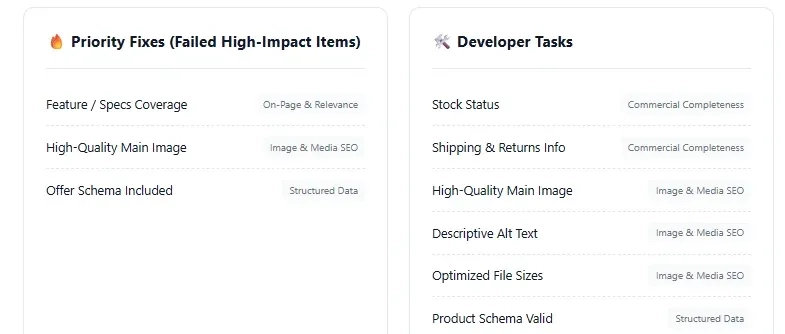
🔥 Priority Fixes (Failed High-Impact Items)
🛠️ Developer Tasks
✍️ Content Tasks
Even strong-looking product pages can struggle to rank because of metadata gaps, thin content, missing schema, UX issues, or technical SEO blockers. Our Product Page SEO Checker helps you audit one page, identify what is holding it back, and generate a clear action plan.
Table of Contents
What Is the Product Page SEO Checker?
The Product Page SEO Checker is a guided audit tool built for reviewing the SEO quality of a single eCommerce product page. It begins with two simple inputs: a Product URL and a Target Keyword. From there, it walks users through a structured multi-step audit covering the most important product-page SEO elements.
As you complete the audit, the tool shows audit progress and a live score estimate. At the end, it generates a report with:
- a final score,
- critical blocker alerts,
- priority fixes,
- developer tasks,
- content tasks,
- and a print/save PDF option.
That makes it more than a basic checker. It works as a practical product-page review workflow for marketers, SEO teams, store owners, and agencies.
Why Product Page SEO Audits Matter
Product pages are often the closest pages to purchase intent, which makes them some of the most important pages on any eCommerce site. But they are also where a lot of SEO opportunities get missed.
A product page may fail to rank because:
- the page is not fully indexable,
- the title tag is weak,
- the description is copied from the manufacturer,
- schema is missing,
- images are not optimized,
- or key trust and UX signals are too weak to support conversions.
The Product Page SEO Checker helps solve that problem by breaking the audit into a clear, repeatable process instead of forcing you to guess what is wrong.
What This Tool Checks
The tool audits a product page across seven core areas:
1. Technical & Indexability
It checks whether the page returns a valid 200 OK status, is indexable, uses a self-referencing canonical, and avoids duplicate parameter-based URLs. Some of these checks are treated as critical blockers.
2. Metadata & Snippets
It reviews title tag presence and length, keyword placement in the title, and meta description quality.
3. On-Page & Relevance
It looks at H1 quality, whether the product description is unique, and whether the page includes enough feature or specification detail.
4. Commercial Completeness
It checks whether the page clearly shows price, stock status, and shipping or returns information.
5. Image & Media SEO
It reviews main image quality, descriptive alt text, and image file optimization for faster loading.
6. Structured Data
It checks whether product schema is valid, whether offer data is included, and whether review or aggregate rating schema is present when relevant.
7. Trust & UX Signals
It looks at visible customer reviews, mobile tap-target usability, and page speed/Core Web Vitals signals.
Improve Your eCommerce SEO
Uncover critical blockers and get a practical action plan. Need expert help beyond the tool? Explore our services to boost your rankings and revenue.
Explore SEO ServicesHow to Use the Product Page SEO Checker
The tool is designed to be simple to use, even if you are not conducting a full technical audit.
Step 1: Enter the Product URL and Target Keyword
Start by adding the exact product page URL you want to review, along with the main keyword that page should rank for. These are the two setup inputs shown on the opening screen.
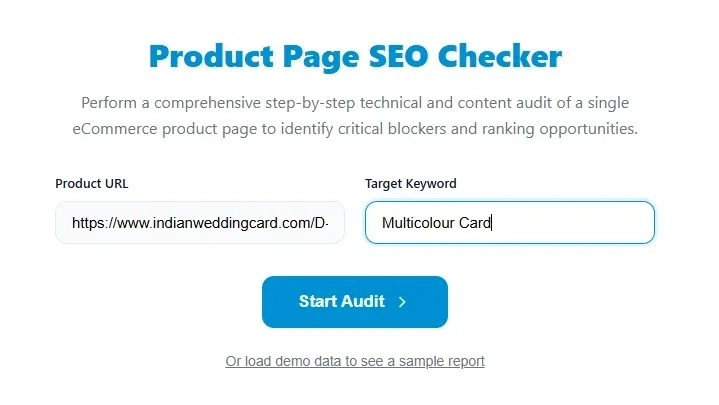
Step 2: Click “Start Audit”
Once the URL and keyword are entered, click Start Audit to begin the review. The tool also offers a demo data option so users can preview a sample report before auditing a live page.
Step 3: Review each audit section one by one
The audit is broken into steps, which keeps the review organized and easier to complete. Each step focuses on one core SEO area such as technical setup, metadata, content quality, schema, or UX.
Step 4: Mark each item as Pass, Partial, Fail, or N/A
For every audit item, choose the status that best matches the page. This makes the tool useful for both quick manual reviews and more detailed SEO assessments.
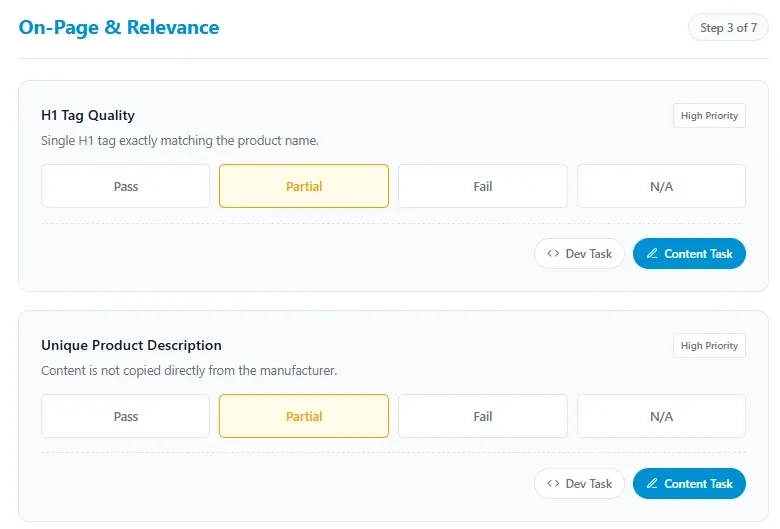
Step 5: Flag issues as Dev Task or Content Task
One of the most practical parts of the tool is the ability to mark an issue as a Dev Task or Content Task. This helps separate technical implementation work from copy or merchandising improvements.
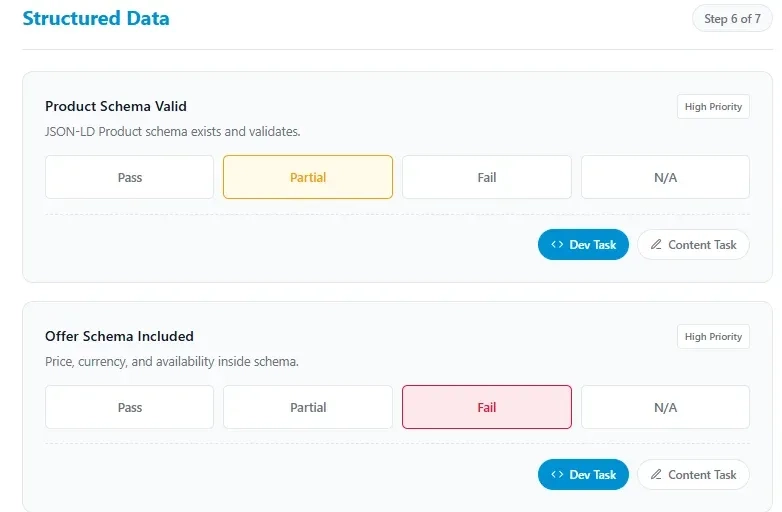
Step 6: Track your progress and live score
As you complete more items, the progress bar updates and the tool calculates a live score estimate. This gives you immediate feedback before the final report is generated.

Step 7: Generate the final report
At the end of the last step, click Generate Report to produce the final output. The report includes the final score, critical blocker warnings, failed high-impact priority fixes, flagged developer tasks, and flagged content tasks.
Step 8: Print or save the report as a PDF
The report screen includes a Print / Save PDF option, making it easy to share the findings with a client, internal team, or stakeholder group.
Screenshot Caption: Print / Save PDF button in the final report view
How to Read the Report
The final report is built to make next steps clear.
A stronger score usually means the page has a healthier SEO foundation across technical setup, metadata, content, schema, and trust signals. A weaker score often means the page has key missing elements that can limit visibility and performance.
If the tool detects serious issues such as indexability or technical blockers, it can show a Critical Blockers Detected alert. The tool’s logic can also cap the score when those blocker conditions are present, which helps make serious issues more obvious.
The report also organizes work into:
- Priority Fixes for failed higher-impact items,
- Developer Tasks for technical changes,
- Content Tasks for copy, metadata, and page-content improvements.
This makes the output useful not just for diagnosis, but also for execution.
Who Should Use This Tool
The Product Page SEO Checker is useful for:
- eCommerce business owners,
- SEO specialists,
- Shopify and WooCommerce managers,
- in-house digital marketing teams,
- agencies auditing product pages,
- and consultants reviewing SEO performance at the page level.
It is especially helpful when a product page is underperforming, not ranking for its target keyword, or failing to convert traffic as expected.
When to Use It
Use this tool when:
- a product page is not ranking well,
- you want to improve SEO for a specific SKU or product line,
- you need a structured audit for a high-priority product page,
- you want to split work between developers and content teams,
- or you need a report that can be saved and shared internally.
It is also useful for building repeatable audit workflows across large eCommerce catalogs.
What This Tool Does Not Replace
The Product Page SEO Checker is a strong page-level audit tool, but it does not replace a full eCommerce SEO audit.
You may still need broader analysis for:
- sitewide crawl and indexability issues,
- internal linking architecture,
- category-page cannibalization,
- duplicate content patterns across the store,
- sitewide speed and template issues,
- and broader keyword mapping strategy.
Think of this tool as a focused product-page audit that helps you identify what to fix first on a specific URL.
Frequently Asked Questions
What does the Product Page SEO Checker do?
It audits a single eCommerce product page using a guided multi-step review and generates a report with a score, blockers, priority fixes, and categorized tasks.
What do I need to start?
You need a Product URL and a Target Keyword.
Does it only give a score?
No. It also provides blocker alerts, priority fixes, developer tasks, content tasks, and a printable report.
Can I use it for client reporting?
Yes. The final report can be printed or saved as a PDF, which makes it useful for agency and consulting workflows.
Can this replace a full SEO audit?
No. It is best used as a page-level diagnostic tool, not a replacement for a complete eCommerce SEO strategy or technical audit.
Related Ecommerce SEO Links and Resources
Teardowns & Case Studies
Carrefour UAE SEO Strategy
Discover the specific ecommerce SEO strategies driving massive organic traffic for Carrefour in the UAE.
Amazon India vs Flipkart SEO
A detailed comparative SEO teardown of how two ecommerce giants battle for search visibility in India.
Spinneys UAE SEO Teardown
Analyzing the successful ecommerce search and content strategies that work for Spinneys in the UAE market.
Etsy Non-Branded Search
Learn how Etsy successfully captures high-volume non-branded search traffic across thousands of categories.
Sephora USA SEO Teardown
An expert analysis of Sephora's highly successful US ecommerce SEO and brand search strategy.
Chewy SEO Strategy
Uncovering the organic search strategies and architectural choices that fuel Chewy's massive ecommerce revenue.
Technical SEO for Large Stores
Key technical SEO considerations, crawl budget optimization, and teardowns for enterprise-level ecommerce sites.
Wayfair Category Page Teardown
A deep dive into how Wayfair structures and optimizes its category pages for maximum organic search visibility.
Sephora Product Page Teardown
A focused teardown of Sephora's product page SEO structure, rich snippets, and on-page optimization.
Tools
Ecommerce SEO Score Calculator
Calculate and evaluate the overall technical and on-page SEO strength of your ecommerce store.
Category Page SEO Auditor
Analyze your category pages to ensure they are properly structured for maximum organic traffic.
Product Schema Validator
Ensure your ecommerce product schema markup is perfectly structured to win rich snippets in search results.
Heading Structure Checker
Verify the hierarchy and SEO effectiveness of the H1, H2, and H3 tags across your ecommerce pages.
- Log in to post comments


 INDIA
INDIA