


Category Page SEO Auditor: Audit Collection and PLP Pages for Rankings
This Category Page SEO Auditor is part of our eCommerce SEO services hub page, where we share practical tools, audits, and strategies to help online stores improve category visibility, rankings, and organic revenue.
Category Page SEO Auditor
Perform a structured manual SEO audit of your eCommerce collection, category, or PLP pages to identify critical ranking blockers.
Your Category SEO Score
Critical SEO Blockers Detected
These issues severely restrict search engines from crawling or indexing this category page. Your score has been capped.
Section Breakdown
Remediation Plan
Targeted fixes based on your audit flags.
🔥 Priority Action Required
💻 Developer Tasks
✍️ Content / Merch Tasks
No flagged tasks. Great job!
Even well-designed category pages can struggle to rank because of crawl issues, weak metadata, poor content depth, unsafe filters, pagination problems, or mobile UX gaps. Our Category Page SEO Auditor helps you manually review a category, collection, or PLP page step by step and turn that audit into a clear remediation plan.
Table of Contents
What Is the Category Page SEO Auditor?
The Category Page SEO Auditor is a structured manual audit tool for reviewing eCommerce collection pages, category pages, and PLPs. It starts with an optional Category URL and Target Keyword, then takes users through a step-by-step audit flow before generating a report.
As users move through the audit, the tool tracks audit completeness, lets them mark findings as Pass, Partial, Fail, or N/A, and supports Needs Dev, Needs Content, and Priority flags. At the end, it generates a final report with a category SEO score, a section breakdown, critical blocker alerts, and a remediation plan organized by flagged tasks.
Why Category Page SEO Matters
Category pages are some of the strongest SEO and commercial assets on an eCommerce website. They often target broader, high-intent keywords and act as the bridge between search discovery and product exploration.
But category pages can also become SEO weak points when they rely on thin copy, faceted filters create duplicate URLs, pagination is poorly handled, or important content and links are hard for search engines to interpret. This tool is useful because it turns those common problem areas into a practical audit flow instead of forcing teams to review them in an unstructured way.
What This Tool Checks
The tool audits a category page across 10 sections:
- Technical & Indexability
- URL & Canonical Control
- Metadata Optimization
- Content & Relevance
- Discovery & Linking
- Faceted Navigation (Filters)
- Pagination SEO
- Structured Data
- Commercial & Merchandising
- Mobile UX & Speed
Within those sections, it checks important elements such as:
- whether the page is indexable
- whether canonical tags are correct
- whether title tags and H1s are aligned
- whether the category has unique and useful intro content
- whether product links are crawlable
- whether faceted filters create unsafe indexation patterns
- whether pagination is discoverable
- whether schema is implemented
- whether merchandising logic is strong
- and whether mobile UX and speed are acceptable.
Several checks are marked as blocker risks, and if failed, they can trigger a blocker alert and cap the final score.
How to Use the Category Page SEO Auditor
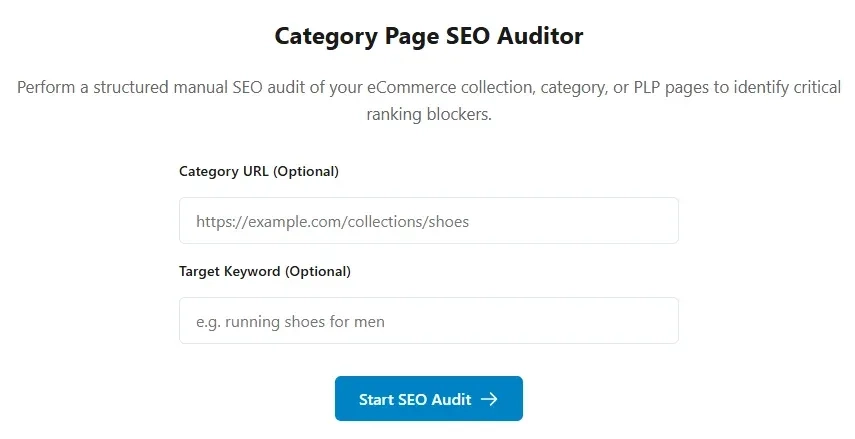
Step 1: Add the category URL and target keyword
The setup screen includes optional inputs for Category URL and Target Keyword. These help contextualize the audit and make the copied summary more useful later.
Step 2: Click “Start SEO Audit”
Click Start SEO Audit to enter the audit wizard. The tool then switches from the setup screen to the step-by-step audit flow.
Step 3: Review each section step by step
The tool presents one section at a time, such as Technical & Indexability, Metadata Optimization, or Faceted Navigation. Each section is shown as a separate step with a step counter and navigation controls.
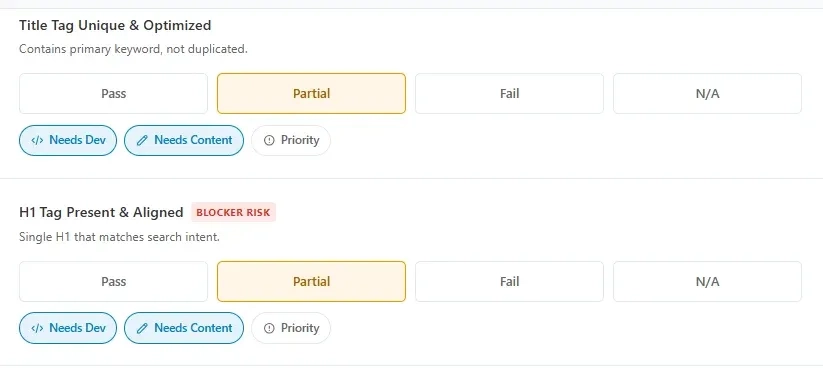
Step 4: Mark each item as Pass, Partial, Fail, or N/A
Each audit item includes four response options: Pass, Partial, Fail, and N/A. This makes the tool flexible enough for both quick reviews and more detailed manual audits.
Step 5: Flag issues by action type
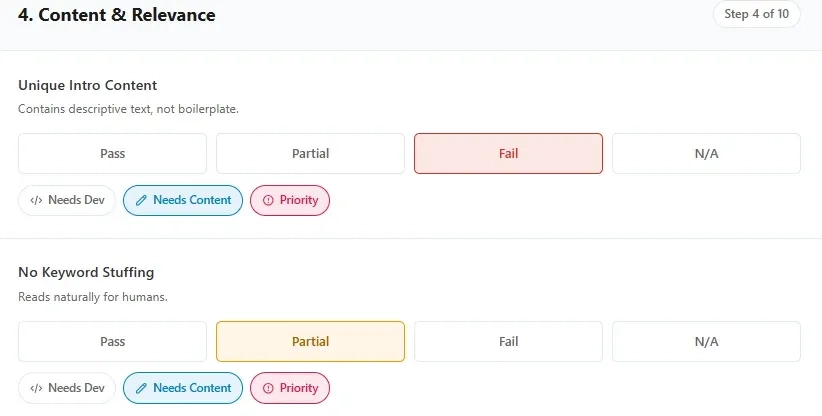
For any item, users can add action flags:
- Needs Dev
- Needs Content
- Priority
This is especially useful for teams that need to separate technical fixes from content or merchandising work.
Step 6: Track audit completeness
As answers are added, the tool updates the Audit Completeness progress bar and percentage.
Step 7: Generate the report
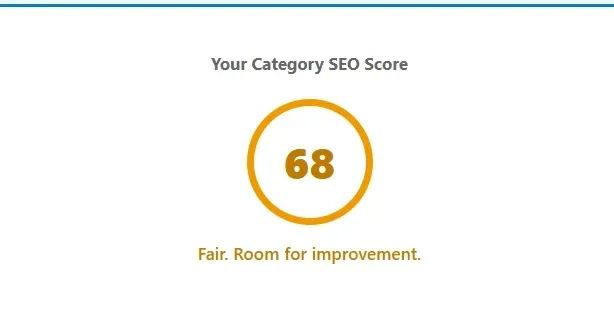
On the final step, users can click Generate Report. The tool calculates the final score, applies a blocker cap when required, and generates the final results view.
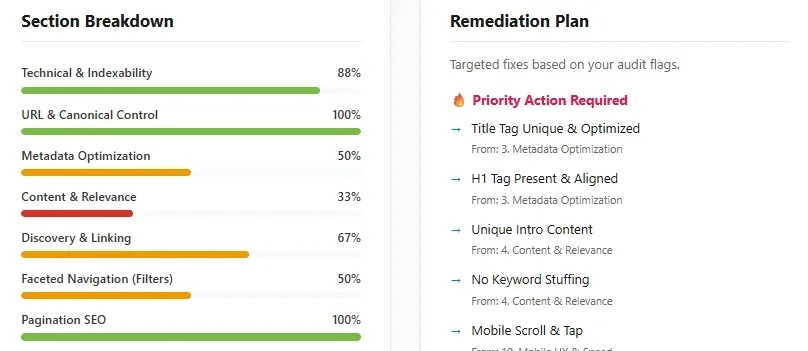
Step 8: Review the section breakdown and remediation plan
The final report includes:
- overall score
- score message
- blocker alert if needed
- section-by-section score bars
- remediation plan with priority, dev, and content tasks.
Step 9: Copy the text summary
The tool also includes a Copy Text Summary button that copies the score, blocker list, dev tasks, and content tasks into a simple summary format for sharing.
How to Read the Report
The report is designed to make the next step clearer.
A higher score usually indicates that the category page is in good shape across indexability, metadata, content, linking, filters, pagination, structured data, merchandising, and mobile UX. A lower score usually signals that the page has meaningful weaknesses across one or more of those areas.
If blocker-risk checks fail, the tool can show a Critical SEO Blockers Detected alert and cap the score at 40. This is useful because it prevents serious crawl or indexation problems from being hidden behind decent scores in other sections.
The Section Breakdown helps you see which parts of the category page are strongest or weakest, while the Remediation Plan converts your flagged items into practical task buckets.
Improve Category Page Rankings
Found critical SEO blockers during your audit? Get expert help optimizing your PLPs and collection pages for maximum visibility.
Explore SEO ServicesWho Should Use This Tool
This tool is useful for:
- eCommerce SEO specialists
- category and merchandising teams
- Shopify and WooCommerce managers
- agencies auditing collection pages
- in-house marketing teams
- consultants reviewing PLP SEO performance
It is especially helpful when a category page is not ranking, not driving expected traffic, or underperforming despite having strong products and branding.
Best Time to Use It
Use the Category Page SEO Auditor when:
- a category or collection page is not ranking well
- you are reviewing PLP templates before rollout
- you want to check faceted navigation and pagination SEO
- you need to divide fixes between developers and content teams
- you want a repeatable page-level audit process for category pages.
What This Tool Does Not Replace
This tool is highly useful for manual category-page auditing, but it does not replace a full eCommerce SEO strategy or a full-site technical audit.
You may still need broader work for:
- overall site architecture
- internal linking across the store
- keyword mapping by category depth
- template-level technical issues
- broader crawl budget analysis
- cross-category cannibalization.
This tool is best used as a focused category-page review and prioritization tool.
FAQs
What are the most impactful e-commerce SEO strategies today?
Tight site architecture, intent-mapped keyword targeting, rich product structured data, fast pages, and deep internal linking to categories and products.
How many clicks from the homepage should product pages be?
Keep important products within three clicks to concentrate link equity and improve crawlability.
Do seasonal pages really help SEO?
Yes. Dedicated festival or event hubs rank for head terms, capture spikes in demand, and can funnel authority to core categories.
How should I measure SEO impact beyond traffic?
Track assisted revenue, traffic value, and conversion rate by template — such as category, product, or campaign — alongside keyword rankings.
What technical issues most often hold back stores?
Duplicate or thin content on product variants, slow image delivery, parameterized URLs, and faceted navigation without proper indexing rules.
Related Ecommerce SEO Links and Resources
Teardowns & Case Studies
Carrefour UAE SEO Strategy
Discover the specific ecommerce SEO strategies driving massive organic traffic for Carrefour in the UAE.
Amazon India vs Flipkart SEO
A detailed comparative SEO teardown of how two ecommerce giants battle for search visibility in India.
Spinneys UAE SEO Teardown
Analyzing the successful ecommerce search and content strategies that work for Spinneys in the UAE market.
Etsy Non-Branded Search
Learn how Etsy successfully captures high-volume non-branded search traffic across thousands of categories.
Sephora USA SEO Teardown
An expert analysis of Sephora's highly successful US ecommerce SEO and brand search strategy.
Chewy SEO Strategy
Uncovering the organic search strategies and architectural choices that fuel Chewy's massive ecommerce revenue.
Technical SEO for Large Stores
Key technical SEO considerations, crawl budget optimization, and teardowns for enterprise-level ecommerce sites.
Wayfair Category Page Teardown
A deep dive into how Wayfair structures and optimizes its category pages for maximum organic search visibility.
Sephora Product Page Teardown
A focused teardown of Sephora's product page SEO structure, rich snippets, and on-page optimization.
Tools
Ecommerce SEO Score Calculator
Calculate and evaluate the overall technical and on-page SEO strength of your ecommerce store.
Product Page SEO Checker
Audit and optimize your individual ecommerce product pages for better rankings and conversions.
Product Schema Validator
Ensure your ecommerce product schema markup is perfectly structured to win rich snippets in search results.
Heading Structure Checker
Verify the hierarchy and SEO effectiveness of the H1, H2, and H3 tags across your ecommerce pages.
- Log in to post comments


 INDIA
INDIA